Route links into Chrome's side panel for focused multitasking
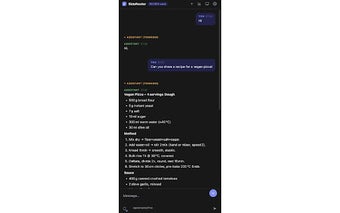
SideRouter, created by an independent developer, is a Chrome extension that redirects links into the browser's side panel to support focused multitasking. It moves selected links or whole domains into a persistent side view instead of new tabs, and it supports rule-based routing, right-click link routing, a global toggle, and URL pattern matching. Researchers, students, and developers gain a way to keep reference material visible while reducing tab clutter and context switches.
Keeps reference material visible without resizing or new windows
SideRouter relies on Chrome’s side panel to present a secondary browsing surface, allowing users to keep documentation or search results alongside a primary tab. Because it integrates with Chrome's native side panel, it avoids changing window size or creating separate windows; this provides a consistent in-browser layout and limits context switching. Compared with split-screen extensions that resize windows, the approach preserves desktop arrangements and reduces manual window management.
Lightweight profile maintains responsiveness during extended research
The extension is described as lightweight with minimal impact on browser performance, which helps it operate during long research sessions without large resource penalties. It runs on Chrome and other Chromium-based browsers that support the side panel, so the same workflow is available across multiple desktop Chromium variants. Users who open many tabs should monitor memory, because any embedded pages still add network requests and rendering work to the browser.
Requires URL access and must contend with in-frame display limits
SideRouter requests permission to read clicked link URLs so it can apply routing rules, a necessary step for automated placement decisions. Some sites send headers that block embedding, so not every external link appears inside the panel; those links fall back to normal tab opening. The project is presented as an open-source independent utility, which allows inspection of its routing logic before adopting broad rules.
Practical utility for reference-heavy workflows, with interaction trade-offs
SideRouter is a practical option for researchers, students, and developers who want a persistent reference surface alongside a primary tab, favoring reading-oriented workflows over complex web-app interactions. Expect a modest setup step to define routing rules. For best results, apply rules selectively to documentation and search pages, and disable the extension during sessions that require rich, interactive sites. This trade-off makes it suited for focused study and code referencing.
Pros
Uses Chrome native side panel for stable in-panel routing
Pattern and domain matching automates placement of reference pages
Context-menu link routing and global toggle for research sessions
Cons
Some sites block in-panel display with framing policies
Requires permission to read clicked URLs for routing rules
Limited to Chromium browsers that support the side panel
Laws concerning the use of this software vary from country to country. We do not encourage or condone the use of this program if it is in violation of these laws. Softonic may receive a referral fee if you click or buy any of the products featured here.